

Upgrade from VCF 9.0.x to VCF 9.1 | Runbook | Part-1 |
- Arun Nukula

- 2 days ago
- 14 min read

Introduction
Welcome back to another deep dive into VMware infrastructure. If your organization is currently running on VMware Cloud Foundation (VCF) 9.0.x and you are mapping out the upgrade journey to the newly released VCF 9.1.0, this guide is crafted specifically for you.
Building on our previous explorations of VCF scaling and lifecycle management procedures, this post will serve as your roadmap.
Upgrading between these releases requires careful orchestration across your compute, storage, and container environments.
I will walk through the architectural shifts, critical prerequisites, and strategic benefits of making the leap to 9.1.0, ensuring your transition is seamless and well-documented.
Components in VCF 9.1
In VCF 9.1, several new components have been introduced from a management perspective. However, there are no significant changes to the core components.
Here's a table which talks about the component name and what functionality does it deliver in VCF 9.1
Component | What does it deliver? |
VCF Operations | Continuous performance optimization, capacity planning, and intelligent remediation across the VCF platform. |
VCF Operations Cloud Proxy | Secure communication and data collection from on-premises or remote data centers to VCF Operations. |
VCF Operations for Networks | Network visibility and analytics to optimize performance and troubleshoot security across virtual and physical networks. |
VCF services runtime | Provides the necessary platform services (Kubernetes) to run modern, containerized management components. |
Fleet lifecycle | Management Component's lifecycle orchestrator |
SDDC lifecycle | Execution engine of the Fleet lifecycle |
Salt Raas | The centralized management console for SaltStack, providing policy-based configuration and compliance at scale. |
Salt Master | The central command server that pushes configuration states and commands to "minions" (managed nodes). |
Real Time Metrics | Instantaneous visibility into system performance and resource utilization without the latency of traditional polling. |
Real Time Metrics Store | A high-performance database designed to store and index high-frequency metric data for historical analysis. |
Log Management | Centralized log collection, high-speed indexing for faster troubleshooting and compliance. |
Telemetry Acceptor | Collects and processes system telemetry data to provide proactive support and usage insights to VMware/Broadcom. |
VCF Automation | Self-service provisioning and infrastructure-as-code capabilities to speed up the delivery of IT resources. |
Migration service engine | |
SDDC Manager | The "brain" of VCF , automates the initial deployment, configuration, and ongoing management of workload domains. |
ESX | The industry-standard Type-1 hypervisor that abstracts physical hardware to run multiple virtual machines. |
vCenter | Centralized management platform for vSphere environments, providing control over hosts, VMs, and clusters. |
HCX | Facilitates seamless workload mobility and migration between data centers and clouds without re-IPing VMs. |
Identity Broker | Provides SSO for VCF platform, integrates with OKTA , PING and many more identity providers. |
NSX | Software-defined networking and security that provides virtualized switching, routing, and distributed firewalls. |
Software Depot | Helps in downloading and storing binaries needed to install , upgrade or patch. |
License Server | Manages licensing in your environment. |
Things to note before you start your upgrade
Make sure there is sufficient memory, CPU, and storage space in the management domain.
Verify that the certificates and passwords are both valid and operational. If they are set to expire in a few days or months, replace them with new ones to ensure they remain valid for a significant period
In version 9.1, there is no Fleet Management Appliance. Instead, the new Fleet lifecycle and SDDC Lifecycle, which form the new lifecycle management system in VCF 9.1, assume its responsibilities. In VCF 9.1, these Fleet and SDDC lifecycle components manage the installation, patching, upgrades, day-to-day actions, and backup and restore of Management components.
When upgrading VCF Operations from version 9.0.x to 9.1, the initial step through the Admin UI involves exporting data from the VCF Operations fleet management appliance and storing all relevant information in the VCF Operations database. Once the new Fleet and SDDC lifecycle components are deployed, they connect with VCF Operations to retrieve and store the data. Keep in mind that until the Fleet and SDDC lifecycle components are deployed, there is no lifecycle management system for your management components.
For Management Components in version 9.0, such as VCF Automation, VCF Operations for Logs, VCF Operations for Networks, and Identity Broker, you won't have any Day-N actions available once they are incorporated into Fleet lifecycle, unless you upgrade them to version 9.1.0.0. Once you perform the upgrade to version 9.1.0.0, all Day-N actions related to these components will become available again.
Plan carefully, and if you have any questions, consult your account representatives or the professional services assisting you with the upgrades at Broadcom Global Support.
For VCF Operations for Networks, include the FQDN and IP addresses of all nodes in the cluster as part of the certificate.
Take snapshots, this is crucial at every possible stage.
Every VCF Instance needs a working VCF Operations Cloud Proxy. If it is not working, make sure to repair it, and if it is missing, deploy it. Ideally, if you begin with VCF 9.0, each VCF Instance in a VCF Fleet will have a VCF Operations Cloud Proxy.
Upgrade Steps (high level)
In this scenario , as an example , my VCF 9.0.x deployment has following VCF Components installed.
Management Components
| Core Components
|
There might be other components , but just taking these as a baseline
High Level Steps:
Upgrade VCF Operations 9.0.x to VCF Operations 9.1
During this process, you will be prompted to enter the root password of the VCF Operations fleet management appliance to retrieve its data and store it in VCF Operations.
The fleet management appliance is shut down after the convergence process is finished.
Retain this appliance until the entire VCF 9.1 upgrade process is complete, and then delete it as a best practice.
After upgrading VCF Operations to version 9.1, the next step is to upgrade SDDC Manager on a specific VCF Instance.
Select the VCF Instance where your VCF Operations is currently deployed. If your VCF Operations is outside of your VCF Instances, decide on a VCF Instance that has sufficient resources to accommodate the new management components.
Once you upgrade SDDC Manager to version 9.1 , go ahead and then install the new VCF Management Services
This would install
VCF Services runtime
Fleet lifecycle
SDDC lifecycle
Salt Raas
Salt Master
Software Depot
Telemetry Acceptor
VCF Identity Broker
License Server
When Fleet lifecycle is deployed , it get's the entire inventory of your management components of version 9.0 and injects in itself.
Once the new Fleet & SDDC lifecycle are deployed, you can now see new management components introduced in VCF 9.1 and the existing ones coming from VCF 9.0 under the Build - Lifecycle - VCF Management - Components pane. Go ahead plan those upgrades as needed.
Continue with your core components upgrade in the same order you did before
NSX
vCenter
ESX
Once the Management Domain upgrades are completed , proceed with your Workload Domains upgrades.
Remember to configure your License Server to license your VCF Fleet
Upgrades Deep-dive
Step-1
VCF Operations upgrade via Admin UI
Check the management components you possess. In this case, I only have VCF Operations 9.0.x and VCF Automation 9.0.x.

The components that are deployed are displayed in the Components pane of VCF Operations under Fleet Management - Lifecycle - VCF Management.

Verify that VCF Operations and the Fleet Management Appliance are connected. The status is displayed in the Admin UI as illustrated below.

In the Admin UI, select the Software Update section on the left, then click "Install Software Update." Ensure you have already downloaded the VCF Operations upgrade pak file, as it's necessary for upgrading your VCF Operations from version 9.0.x to 9.1.
Please disregard any instructions suggesting the use of a fleet management appliance in this section. You should utilize the Admin UI for version 9.1. After that, you can employ the new Fleet lifecycle for future upgrades, applicable from version 9.1 onward.

Browse the VCF Operations upgrade pak file and choose it for uploading.

Select upload

The upload process has started, and it will take some time.


After the upload is finished, the properties of the pak file will be displayed in the UI. At this point, proceed by clicking on NEXT.

Read the End User License Agreement, accept it, and then click NEXT.

Read Update and Release information, then click NEXT

During the upgrade process, the Admin UI will be unavailable as casa is upgraded in the background, but it will be back shortly.
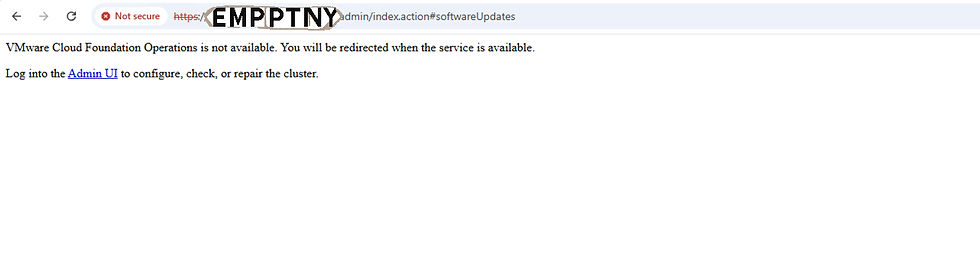
After some time, during validations, you will be prompted to enter the root password for the VCF Operations fleet management appliance. Make sure to provide it. This is necessary to retrieve information from the fleet management appliance and save it in VCF Operations. Skipping this step is pointless.

Enter fleet management appliance root password and click OK

Installation of the PAK file begins

Upgrade of VCF Operations is now complete.

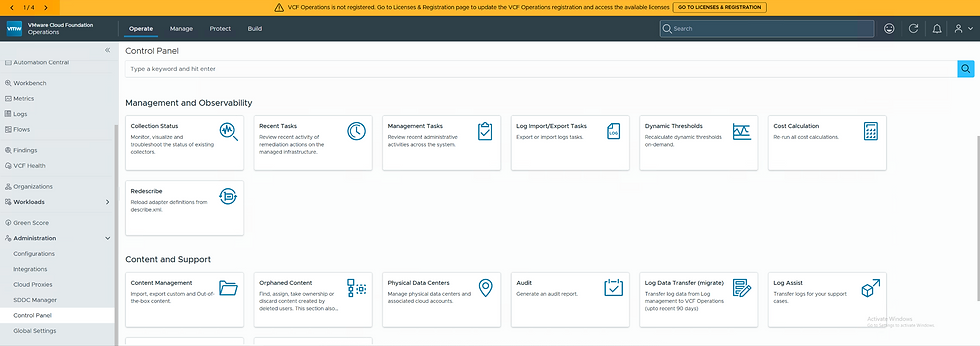
Log in to VCF Operations, and you will notice the new navigation options introduced in VCF 9.1.

To confirm the integration of Fleet Management Convergence 9.0 into VCF Operations 9.1, navigate to Operate - Administration - Control Panel - Management Tasks. There, you will find a task titled "Fleet Management Appliance Data Convergence." Click on this task to view detailed information about the process.


The logs you need to monitor during VCF Operations upgrades are
VCF Operations upgrade:
/var/log/vmware/vcops/vcops_upgrade**.log

Fleet Management Data Convergence
/storage/log/vcops/log/component-manager-plugin-**.log
Here's a snippet on some important lines from the Fleet Management Data Convergence task from the component-management-plugin-**.log
### Convergence Begins. Since you have entered the password, it detects that the password is not empty and good to start the convergence process ###

2026-05-12T13:07:47.331Z INFO component-manager-plugin 32205 [ops@4413 threadId="710" threadName="ServerConnection on port 10000 Thread 10" operationId="MAznzNt6cCmtuDoceKpjtobSZJs6ReP2"] [com.vmware.vrealize.lcm.lcops.service.LcmMigrationServiceImpl.initiateMigration] - Fleet Management root password is not empty

### Fetches the task which needs to be done and processes it. Invokes the convergence ###

2026-05-12T13:07:47.489Z INFO component-manager-plugin 32205 [ops@4413 threadId="710" threadName="ServerConnection on port 10000 Thread 10" operationId="4CNa4Dow9J9yOWdnm9z9M8LsY5lxulNs"] [com.vmware.vrealize.lcm.requestservice.core.RequestProcessor.processNewlyCreatedRequests] - Fetched Request Definition : invokelcmmigration
2026-05-12T13:07:47.544Z INFO component-manager-plugin 32205 [ops@4413 threadId="710" threadName="ServerConnection on port 10000 Thread 10" operationId="4CNa4Dow9J9yOWdnm9z9M8LsY5lxulNs"] [com.vmware.vrealize.lcm.requestservice.core.planner.ComponentsInventoryPlanner.processRequest] - Processing Lcm Migration Request with RequestName : invokelcmmigration

### Connection established with the fleet management appliance ###

2026-05-12T13:07:51.076Z INFO component-manager-plugin 32205 [ops@4413 threadId="1213" threadName="ComponentManagerTaskEngine-3" operationId=""] [com.vmware.vrealize.lcm.commonplugin.migration.util.MigrationUtil.readRemoteData] - Connecting with legacy lcm .....
2026-05-12T13:07:51.115Z INFO component-manager-plugin 32205 [ops@4413 threadId="1213" threadName="ComponentManagerTaskEngine-3" operationId=""] [com.vmware.vrealize.lcm.commonplugin.migration.util.MigrationUtil.readRemoteData] - Connection created successfully with legacy lcm

### Shutsdown the fleet management appliance ###

2026-05-12T13:08:06.737Z INFO component-manager-plugin 32205 [ops@4413 threadId="1290" threadName="ComponentManagerTaskEngine-9" operationId=""] [com.vmware.vrealize.lcm.commonplugin.migration.tasks.LcmShutdownTask.execute] - Shutting down legacy lcm...
2026-05-12T13:08:06.806Z INFO component-manager-plugin 32205 [ops@4413 threadId="1290" threadName="ComponentManagerTaskEngine-9" operationId=""] [com.vmware.vrealize.lcm.util.Expect4jUtil.executeRemoteCommand] - Executing command : sudo shutdown -h now
2026-05-12T13:08:08.495Z INFO component-manager-plugin 32205 [ops@4413 threadId="1290" threadName="ComponentManagerTaskEngine-9" operationId=""] [com.vmware.vrealize.lcm.util.Expect4jUtil.executeRemoteCommand] - Executing command completed : sudo shutdown -h now
2026-05-12T13:08:08.566Z INFO component-manager-plugin 32205 [ops@4413 threadId="1290" threadName="ComponentManagerTaskEngine-9" operationId=""] [com.vmware.vrealize.lcm.commonplugin.migration.tasks.LcmShutdownTask.execute] - Shutting down legacy lcm completed
2026-05-12T13:08:08.566Z INFO component-manager-plugin 32205 [ops@4413 threadId="1290" threadName="ComponentManagerTaskEngine-9" operationId=""] [com.vmware.vrealize.lcm.platform.automata.service.Task.injectEvent] - Injecting Edge :: OnShutdownLcmCompleted

### Convergence Completed ###

2026-05-12T13:08:08.994Z INFO component-manager-plugin 32205 [ops@4413 threadId="1126" threadName="ForkJoinPool.commonPool-worker-10" operationId=""] [com.vmware.vrealize.lcm.automata.core.processor.EventProcessor.getStateFromMachineDefinition] - State to find :: com.vmware.vrealize.lcm.platform.automata.service.task.FinalTask
2026-05-12T13:08:08.995Z INFO component-manager-plugin 32205 [ops@4413 threadId="1126" threadName="ForkJoinPool.commonPool-worker-10" operationId=""] [com.vmware.vrealize.lcm.automata.core.service.StateMachineInstanceServiceImpl.saveStateMachineInstance] - Saving state machine instance request: StateMachineInstanceDTO(machineId=invokelcmmigration, status=CREATED, currentState=com.vmware.vrealize.lcm.platform.automata.service.task.FinalTask, requestInitiator=92afb4e0-f79f-42da-b9e2-cd23ea6aac28, userRequestId=39a389bc-a7f7-4161-a6bf-2331a3ffe330)
Step-2
SDDC Manager Upgrade
We are currently at version 9.1 for VCF Operations. There is no lifecycle management system for Management Components. We need to install the new VCF Management services we previously discussed.
When you log into VCF Operations - Build - Lifecycle - VCF Management, it will show you the same information.
Refer to the screenshot below.
This phase is crucial. At this point, none of your management components are linked to any lifecycle management system.
As mentioned earlier, you need to choose a VCF Instance where you want to deploy the new VCF Management services. The responsibility for deploying these services lies with the SDDC Manager, so upgrading it is the next step.
As previously mentioned, choose the VCF Instance where VCF Operations is deployed (recommended) or select one with sufficient resources.

Once selection is made click "Go To VCF Instance"

Make sure your Depot is set up correctly, as this is crucial for upgrading the SDDC Manager. Depending on your environmental architecture, you can select either Online or Offline.

Download the SDDC Manager upgrade binaries of version 9.1.0.0. That's all I need for now. I can download the rest later. There's no hurry.


Allow the download to complete


It's time to perform prechecks before upgrading SDDC Manager. Click the RUN PRECHECK button to initiate the precheck wizard.

In the precheck wizard, choose the target version, which in our case is version 9.1.0.0. Select this version.

After choosing the Target Version, proceed to select the precheck scope. I prefer not to conduct prechecks for all components. I want to focus on the SDDC Manager, so let's select it and move forward.

The Prechecks commence

Prechecks are now finished.


With the prechecks finished, proceed by clicking on "Plan Upgrade."

Select the target version which is VMware Cloud Foundation 9.1.0.0

Click NEXT
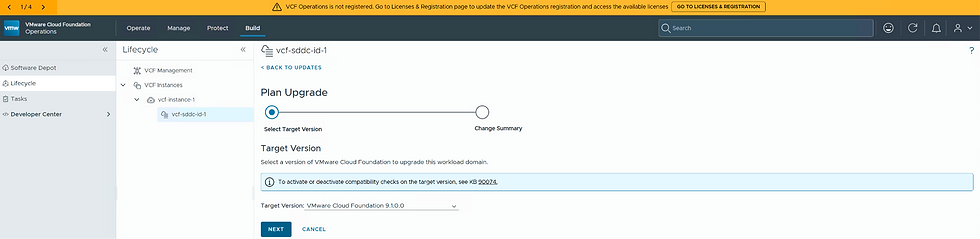
Review the upgrade plan , here's the list of core components which would be upgraded to VMware Cloud Foundation 9.1.0.0

After reviewing, click CONFIRM to submit the upgrade plan creation.

Select DONE to submit the upgrade plan, which will create one.


It's crucial to capture a snapshot of the SDDC Manager.

Once your plan is created, click on "Available Updates" and then select "UPDATE NOW" to start the SDDC Manager upgrade.

Select "START UPGRADE" in the confirmation dialog box labeled "Confirm SDDC Manager Update." This procedure has been in place for over ten years and is quite familiar to VCF administrators.

SDDC Manager Upgrade is queued

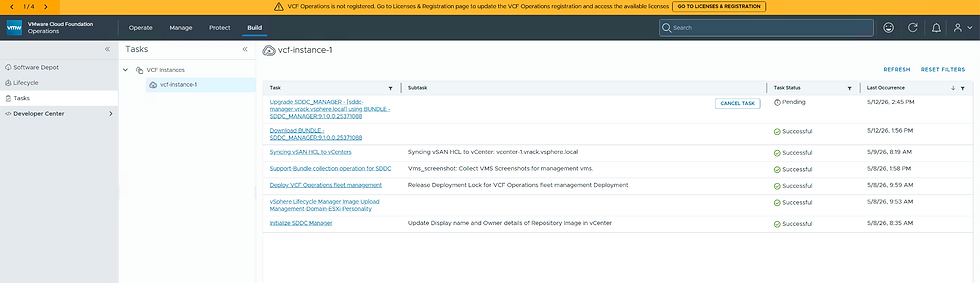
SDDC Manager Upgrade begins

After approximately 30 minutes, the SDDC Manager upgrade is finished, and you will see the following page. It clearly outlines your next steps:
Reconfigure the Depot
Download the binaries to install your VCF Management Services
Install the VCF Management Services

After you have configured your Depot , your good to proceed to the next step of downloading the required binaries.

The binaries you need to download are for following components.
Salt Master
Identity Broker
Fleet Lifecycle
Salt RaaS
Salt Master
VCF Services runtime
License Server
Software Depot


Choose the necessary binaries and click Download to initiate the process.

All of the necessary binaries are now downloaded.

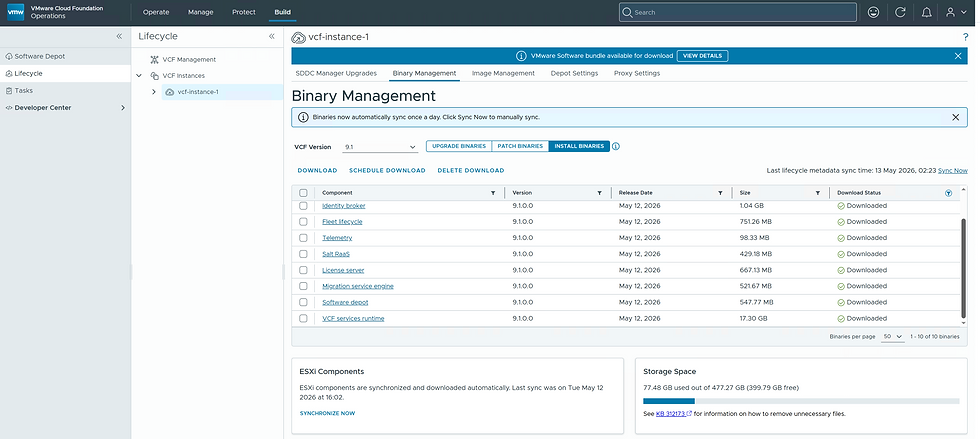
Navigate to Build - Lifecycle - VCF Instance and select the SDDC Manager upgrades section. Having completed the previous step of downloading all required binaries, you are now ready to proceed with the installation of the VCF Management services, known as the "Install Components" phase.
Click on Install. A screen will appear, prompting you to enter the VCF Operations FQDN and the password for the VCF Operations "admin" user.
This is necessary for the SDDC Manager to verify that VCF Operations is updated to version 9.1.
A VCF Operations Cloud Proxy is operational.
The fleet lifecycle connects with VCF Operations to retrieve the inventory and store it.

After you enter VCF Operations FQDN and Admin password , click on CONNECT

When you click CONNECT, a thumbprint appears for confirmation.

The connection has been established. Deployment Parameters will only be requested if all validations are successful.
Potential Issues
Connectivity with VCF Operations. Address these problems.
Cloud Proxy unavailability. If a cloud proxy is not deployed on the chosen VCF Instance, proceed to deploy one manually using the VCF Operations Admin UI. Currently, there is no lifecycle management system available to automate this installation. This is why it was recommended to ensure you have a functioning cloud proxy from the start.

Deployment Parameters you need to enter are
VCF services runtime CIDR | These are set of contigous IP's needed for the nodes which would host the new VCF Management services. Minimum 12 IP's and Maxium of 30 IP's. |
VCF services runtime FQDN | FQDN used for the platform which hosts the VCF Management services. |
Fleet components FQDN | FQDN used by the management services scoped at fleet , for example
|
Instance components FQDN | FQDN used by the management services like
|
Identity Broker FQDN | FQDN used by VCF Identity Broker (external) |
Password | The password, whether generated by the wizard or manually entered, will be applied to the following accounts:
Note: Remember to save the password, whether it was auto-generated by the wizard or manually entered. You cannot retrieve it later unless you reset it. Unlike previous versions, we will not save passwords anymore. |
License Server FQDN | FQDN leveraged by the license server or a new appliance part of VCF Operations 9.1 ( similar to cloud proxy) |
VCF services runtime size | Select the respective size of the VCF services runtime ( for production , it good to keep it on Medium or beyond ) |

Once all necessary deployment parameters are entered , click INSTALL

Remember there are some validations which takes place.
Checks if all of the necessary binaries are available to install components.

If there are any missing binaries as shown in the example below, it will throw an exception
Domain Manager Logs

2026-05-13T05:02:47.422+0000 DEBUG [vcf_dm,6a0405f6cfc9edd99a1d90043bc9f4ed,c53d] [c.v.v.v.f.a.v.ValidateComponentBinariesAction,dm-exec-186]  Image file for component VCF services runtime is valid.


2026-05-13T05:02:47.433+0000 DEBUG [vcf_dm,6a0405f6cfc9edd99a1d90043bc9f4ed,c53d] [c.v.v.v.f.a.v.ValidateComponentBinariesAction,dm-exec-186]  Image file for component License server is valid.

2026-05-13T05:02:47.445+0000 DEBUG [vcf_dm,6a0405f6cfc9edd99a1d90043bc9f4ed,c53d] [c.v.v.v.f.a.v.ValidateComponentBinariesAction,dm-exec-186]  Image file for component Salt master is valid.

2026-05-13T05:02:47.456+0000 DEBUG [vcf_dm,6a0405f6cfc9edd99a1d90043bc9f4ed,c53d] [c.v.v.v.f.a.v.ValidateComponentBinariesAction,dm-exec-186]  Image file for component Identity broker is valid.

2026-05-13T05:02:47.467+0000 DEBUG [vcf_dm,6a0405f6cfc9edd99a1d90043bc9f4ed,c53d] [c.v.v.v.f.a.v.ValidateComponentBinariesAction,dm-exec-186]  Image file for component Fleet lifecycle is valid.

2026-05-13T05:02:47.476+0000 ERROR [vcf_dm,6a0405f6cfc9edd99a1d90043bc9f4ed,c53d] [c.v.v.v.f.a.v.ValidateComponentBinariesAction,dm-exec-186]  Failed to get install image for component VCF_SDDC_LCM, version 9.1.0.0.25371107

com.vmware.evo.sddc.common.services.error.SddcManagerServicesIsException: Product VCF_SDDC_LCM install image not found for version 9.1.0.0.25371107.

2026-05-13T05:02:47.504+0000 DEBUG [vcf_dm,6a0405f6cfc9edd99a1d90043bc9f4ed,c53d] [c.v.e.s.c.v.util.ResponseUtil,dm-exec-186]  Build validation response: {"errorCode":"FAILED_TO_RETRIEVE_COMPONENT_BINARY.error","arguments":["SDDC lifecycle","9.1.0.0.25371107"],"context":{"severity":"ERROR","bundleName":"com.vmware.evo.sddc.common.validation.errors.messages","validation.taskId":"0a000004-9e1c-1a4d-819e-1fb6953d0046"},"message":"Could not retrieve binary for component SDDC lifecycle version 9.1.0.0.25371107","remediationMessage":"Connect to a valid depot and download the binary for component SDDC lifecycle version 9.1.0.0.25371107"}

2026-05-13T05:02:47.517+0000 DEBUG [vcf_dm,6a0405f6cfc9edd99a1d90043bc9f4ed,c53d] [c.v.v.v.f.a.v.ValidateComponentBinariesAction,dm-exec-186]  Image file for component Telemetry is valid.

2026-05-13T05:02:47.530+0000 DEBUG [vcf_dm,6a0405f6cfc9edd99a1d90043bc9f4ed,c53d] [c.v.v.v.f.a.v.ValidateComponentBinariesAction,dm-exec-186]  Image file for component Software depot is valid.

2026-05-13T05:02:47.540+0000 DEBUG [vcf_dm,6a0405f6cfc9edd99a1d90043bc9f4ed,c53d] [c.v.v.v.f.a.v.ValidateComponentBinariesAction,dm-exec-186]  Image file for component Salt RaaS is valid.

2026-05-13T05:02:47.540+0000 DEBUG [vcf_dm,6a0405f6cfc9edd99a1d90043bc9f4ed,c53d] [c.v.e.s.c.v.util.ResponseUtil,dm-exec-186]  Number of failed validations: 1

2026-05-13T05:02:47.541+0000 DEBUG [vcf_dm,6a0405f6cfc9edd99a1d90043bc9f4ed,c53d] [c.v.e.s.c.v.util.ResponseUtil,dm-exec-186]  Build validation response: {"errorCode":"VALIDATE_COMPONENT_BINARIES.error","arguments":[],"context":{"severity":"ERROR","bundleName":"com.vmware.evo.sddc.common.validation.errors.messages","validation.taskId":"0a000004-9e1c-1a4d-819e-1fb6953d0046"},"message":"Not all required component binaries for selected versions are available locally","remediationMessage":"Ensure component binaries are accessible and not corrupted"}

2026-05-13T05:02:47.543+0000 DEBUG [vcf_dm,6a0405f6cfc9edd99a1d90043bc9f4ed,c53d] [c.v.e.s.o.c.c.ContractParamBuilder,dm-exec-186]  Contract task Verify that VCF management components binaries for selected versions are available result: {"response":{"errorCode":"VALIDATE_COMPONENT_BINARIES.error","arguments":[],"context":{"severity":"ERROR","bundleName":"com.vmware.evo.sddc.common.validation.errors.messages","validation.taskId":"0a000004-9e1c-1a4d-819e-1fb6953d0046"},"message":"Not all required component binaries for selected versions are available locally","remediationMessage":"Ensure component binaries are accessible and not corrupted","nestedErrors":[{"errorCode":"FAILED_TO_RETRIEVE_COMPONENT_BINARY.error","arguments":["SDDC lifecycle","9.1.0.0.25371107"],"context":{"severity":"ERROR","bundleName":"com.vmware.evo.sddc.common.validation.errors.messages","validation.taskId":"0a000004-9e1c-1a4d-819e-1fb6953d0046"},"message":"Could not retrieve binary for component SDDC lifecycle version 9.1.0.0.25371107","remediationMessage":"Connect to a valid depot and download the binary for component SDDC lifecycle version 9.1.0.0.25371107"}]}}
Go back to INSTALL BINARIES section under Binary Management and download the missing binary for the component in question. In this example , it's the SDDC lifecycle.


Now that the missing binary download is complete , click INSTALL to start the installation process.


Since the "Install Components" process is handled by the SDDC Manager, selecting Build - Lifecycle - Tasks will display the workflow being executed.

There are a bunch of tasks which will be executed.

It will take a while to complete these tasks and once done , now you have all of the necessary components installed.

Returning to VCF Operations - Build - Lifecycle - VCF Management, you will now see all the newly deployed components along with your existing management components such as:
Automation
Identity broker
Operations for Networks
Log Management (formerly known as Operations for Logs)
In my example, since I only had VCF Automation in the 9.0.x version, you will see it displayed as version 9.0.2. All the others are on version 9.1.0.0.

As a next step , we can now proceed to upgrade VCF Automation as this was the only management component i had to begin with next to VCF Operations
We shall into VCF Automation upgrade deep dive in the next blog.

Let's deep dive into what are the different tasks which are performed during the VCF Management Components install.
List of tasks during VCF Management Components installation
Validate VCF Management Components specification

Validate VCF Instance Name

Update VCF Instance Name

Automation Helper Action

Generate VMware Components Image Location Path

Prepare Update VCF Management Components Deployment Status Input Data

Save VCF Management Components

Prepare input for the deployment of VSP cluster

Update VCF Management Services Deployment Status

Automation Helper Action

Validate VSP cluster creation specification

Bootstrap VCF Services Platform

Configure VCF Services Platform

Add VM Name Prefix to NSX firewall exclusion list

Update VCF Management Services Deployment Status

Update VCF Management Components

Register Appliance Certificate with VCF service runtime

Deploy Software Depot Component

Configure Software Depot Component

Upload PVC, URM and VVS metadata to Software Depot

Automation Helper Action

Update VCF Management Components

Update VCF Management Components

Deploy Lifecycle Components

Configure Lifecycle Components

Update VCF Management Components

Update VCF Management Components

Generate VCF Management Component Deployment Input Data

Prepare input for importing existing VCF Operations deployment to Fleet lifecycle

Import VCF Operations in Fleet Lifecycle

Prepare input for adding Cloud Proxy to existing VCF Operations deployment

Install VCF Cloud Proxy using Fleet Lifecycle

Complete the installation of VCF Operations

Prepare input for the deployment of VCF License Server

Get the binary path of VCF License ServerDeploy VCF License ServerAutomation Helper Action

Add VMs to NSX Distributed Firewall Exclusion ListFinish License Server Deployment

Generate Telemetry Deployment Input DataUpdate Telemetry Deployment Status

Install Telemetry using Fleet Lifecycle

Update Telemetry Deployment Status

Generate Identity Broker Deployment Input Data

Update Identity Broker Deployment Status

Install Identity Broker using Fleet Lifecycle

Update Identity Broker Deployment Status

Generate Salt Server Deployment Input Data

Update Salt Server Deployment Status

Install Salt Server using Fleet Lifecycle

Update Salt Server Deployment Status

Generate Salt Master Deployment Input Data

Update Salt Master Deployment Status

Install Salt Master using Fleet Lifecycle

Update Salt Master Deployment Status

Finish Fleet Lifecycle Components Deployment

Update VCF Management Components

Update VCF Management Components
Let's understand some of the snippets and the log paths involved here.
Since SDDC Manager is the one who is doing the installation of the VCF Management Services , all along the deployment you need to look into the SDDC Manager logs only.
Once the Fleet lifecycle and SDDC lifecycle are deployed , you have to look into those logs to begin with. We shall discuss deep-dive on how and what we need to check in the upcoming blogs.
Domain Manager Logs
/var/log/vmware/vcf/dominmanager/domainmanager.<<date>>.log

Common Services Logs
/var/log/vmware/vcf/commonsvcs/vcf-commonsvcs**.log


Comments